Online booking, rebuilt around AI

Let customers book themselves. Day and night.

Customers schedule and book appointments online, straight onto the calendar your team already uses: no double calendar, no phone tag. And when they would rather text, AI replies can book it too.

Deposits at bookingOne calendar for every bookingPer-location links and QR codes
The Booking waitlist page with the switch to offer cancelled times to the waitlist turned on
5,000+businesses on Franpos
4industries, one platform
100+reports & dashboards

Your calendar, open for business every hour, with an assistant that never says call back later.

01 · Live in three moves

From a switch to a full calendar

1

Turn on the widget

In Marketing, open Online booking widget, switch it on under Status and choose what customers can book under Modules.

2

Make it yours

Set your accent color, title and logo under Branding, and choose what customers see After booking.

3

Paste it on your site

Copy the embed code onto your website and add your site to the allowed domains.

A calendar that fills itself

Booking, deposits and waitlist, synced to the terminal your team already uses.

Bookings

Deposits up front. Surprises never.

Online bookings land on the same Booking calendar your front desk sees.

  • A first-time customer pays the deposit online; a customer who has completed an appointment books without one
  • Bookings that need approval are listed under Requires approval
  • Offer cancelled times to the waitlist, and the first customer to tap takes the slot
  • Give each location its own booking link or QR code
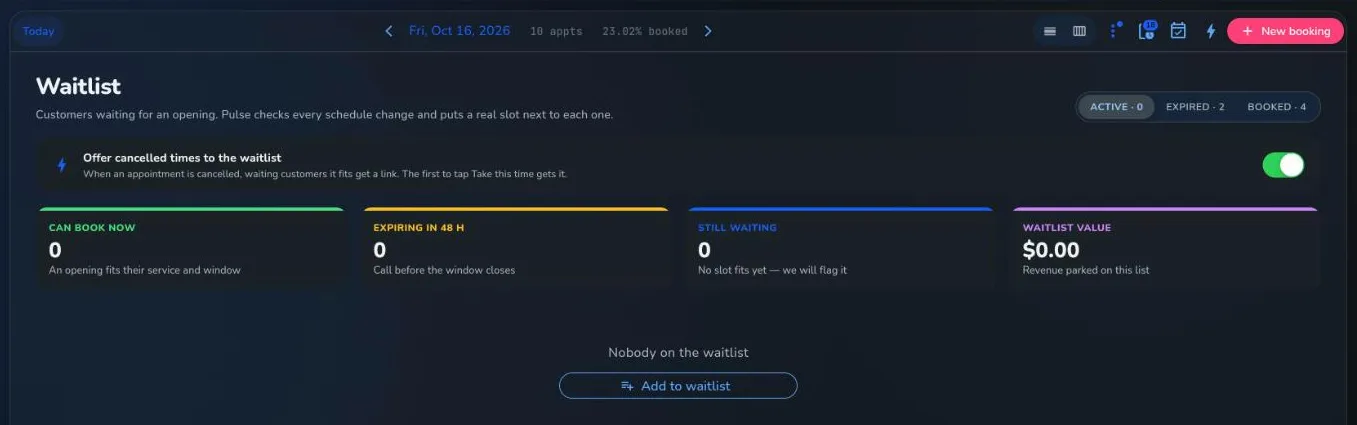
The Booking waitlist page with the switch to offer cancelled times to the waitlist turned on

A real Franpos screen, from a demo store with sample data.

Find the leaks

See where bookings slip away

The Booking funnel tab shows online booking drop-offs, so you know where customers give up.

  • Booking funnel is a tab on the Marketing page
  • Campaigns can link straight to online booking
  • Boarding, daycare and mobile grooming book through the same widget
Marketing Campaigns with revenue from marketing, emails sent and texts sent

A real Franpos screen, from a demo store with sample data.

Businesses are switching to online booking.

★★★★★
“Online booking with deposits cut our no-shows in half. My chairs stay full without the phone tag.”
Carlos D.Salon owner · Miami, FL

Frequently asked questions about Franpos online booking

Does Franpos offer online appointment booking?
Yes. Customers book 24/7 with the online booking widget on your website, with availability that follows your real schedule.
Can I take a deposit at the time of booking?
Yes. Online, a first-time customer pays the deposit; a customer who has had a completed appointment books without one.
Does online booking sync with my POS?
Yes. Online bookings land on the same Booking calendar, and the customer and payment are in the same Franpos system as your checkout.
The widget will not load on my website. What should I check?
Make sure it is switched on and that your website address is in the list of allowed website domains, then check you pasted the embed code and turned on the services under Modules.
What does it cost?
Every business is different, so we quote per location. Book a demo and we will walk you through it.

Open for bookings, every hour.

Book a demo and we will put the widget on your calendar.

Trusted by thousands of businesses, including

Woof Gang BakeryTraegerRunzaMenchie'sEarthWise PetMud BayPet PlanetDog KrazyPro Image SportsPet WantsBest West Pet FoodsBrothers Country SupplySam's Cats & DogsMagoo's Pet OutletWoof MeowDogPerfectPACGatewayShubhSumUpWoof Gang BakeryTraegerRunzaMenchie'sEarthWise PetMud BayPet PlanetDog KrazyPro Image SportsPet WantsBest West Pet FoodsBrothers Country SupplySam's Cats & DogsMagoo's Pet OutletWoof MeowDogPerfectPACGatewayShubhSumUp