Online ordering, rebuilt around AI

Your menu, your website, your orders. Online ordering with your name on it.

Imagine a website that is also your busiest register. Guests browse your menu, build a combo, pay or choose to pay at the counter, and the order lands on the board and in the kitchen before they have closed the tab. Franpos is online ordering software built into the point of sale you already run.

Website and ordering built inOne board for every online orderAlerts that chime until someone answers
The Website page: the live site, its template and the modules switched on
5,000+businesses on Franpos
4industries, one platform
100+reports & dashboards

One menu feeding the register, the website and the kitchen, with an intelligence that paces the rush.

A website that takes orders

Pick a template, choose the modules your site shows, connect a domain and publish. Ordering is already wired in.

Your site

Launch in four steps

Set up your site from the Website page: Template, Modules, Domain, then Publish.

  • A working Franpos web address works as soon as you publish, and you can connect your own domain any time
  • Add a blog, size guides and a Brand with your logo, colors and fonts
  • A Gift orders option adds a This is a gift choice and a message box at checkout
  • An Age check asks shoppers to confirm their age, for every order or only age-restricted products
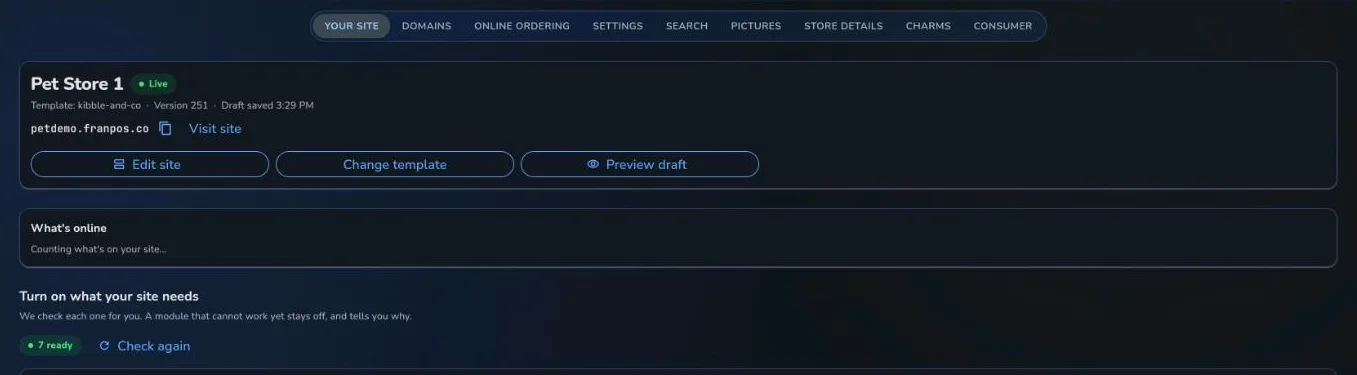
The Website page: the live site, its template and the modules switched on

A real Franpos screen, from a demo store with sample data.

Checkout

Let guests pay the way they want

Each way of paying is its own switch, and a method that is off does not appear at checkout.

  • Card payment, Pay at store, gift card, pay by account or check
  • Allow guest checkout, or ask customers to sign in
  • Set a Default preparation time and limit how far ahead customers can order
  • Choose who gets an email when an order comes in
Menu

The same menu, everywhere

Menus choose where they show: the register, online, the home page and delivery apps.

  • A combo meal shows each part with its rule, such as Required, choose 1, or Optional, choose up to 2
  • Optional groups of choices start folded so the item page stays short
  • Available online and Show on home page are switches on each menu
  • 86 an item and it stops selling online and on linked marketplaces

Orders that land where the work is

Online orders and order requests share one board with the rest of your pickups and deliveries.

The board

New, Preparing, Ready, Done

Each card has one main button that moves the order to its next step.

  • Lanes: New, Preparing, Ready, Out for delivery and Done, with a shelf for orders due later
  • Accept or Decline a request, Start, Mark ready, then Hand off when the customer collects
  • Scan the QR code on a customer's pickup pass and the order opens
  • Resend ready message if the customer says they never got it
  • Cards warn when an order waits too long for pickup
Alerts

A counter that never misses one

Alerts are set per device, so the tablet staff watch is the one that chimes.

  • Receive online orders, Play a sound and Repeat until someone attends
  • Print notification slip prints on that device's receipt printer in the Franpos app
  • A restaurant can Send to kitchen immediately, so the ticket prints on arrival
Pacing

A busy kitchen, protected

Orders throttling spreads online orders out by how long each takes to prepare.

  • Set Default preparation time (minutes) and Lead time (minutes)
  • Restaurants add Kitchen bandwidth and Slot time
  • Maximum slot shifting allowed decides how far an order may be pushed back before it is rejected
03 · Never oversell

Stock that is honest online

Decide what happens when something is nearly gone.

Sold-out items

Allow to order out of stock items, or List sold-out items instead of hiding them.

Online safety stock

Keep a number of units that are never shown or sold online, and set a low-stock threshold for Limited stock.

Stock holds

Hold stock for unpaid online orders until they are paid or the hold runs out.

Pickup and delivery

Turn on store pickup, delivery or shipping in Delivery settings, with fees, minimums and hours.

Online ordering, answered

How do I turn on online ordering?
In the Online ordering settings, turn on Enable online ordering, then choose how customers can pay and whether to allow guest checkout. You can also set a Default preparation time and who gets an email when an order comes in. Online ordering is part of an add-on, so contact us if you do not see it.
Do I need my own domain name?
No. A working Franpos web address is chosen for you and works as soon as you publish. You can connect your own domain at any time.
Where do online orders show up?
On the Pickup and delivery board, in lanes from New to Done. A counter device set to receive online orders chimes when one arrives.
Can I stop the kitchen being flooded?
Yes. Orders throttling spreads orders out by preparation time, and restaurants can set a Kitchen bandwidth and Slot time.
Can customers order combo meals online?
Yes, when the meal is based on a menu. Each part of the combo shows its rule, such as Required, choose 1, and guests pick within your limits.
Can I run delivery from the same orders?
Yes. Pickup, delivery and shipping are order types, and a driver sees My deliveries with directions and proof photos.
What does it cost?
Every business is different, so we quote per location. Book a demo and we will walk you through it.

Open for orders, around the clock.

Book a demo and place a test order from a real Franpos website.

Trusted by thousands of businesses, including

Woof Gang BakeryTraegerRunzaMenchie'sEarthWise PetMud BayPet PlanetDog KrazyPro Image SportsPet WantsBest West Pet FoodsBrothers Country SupplySam's Cats & DogsMagoo's Pet OutletWoof MeowDogPerfectPACGatewayShubhSumUpWoof Gang BakeryTraegerRunzaMenchie'sEarthWise PetMud BayPet PlanetDog KrazyPro Image SportsPet WantsBest West Pet FoodsBrothers Country SupplySam's Cats & DogsMagoo's Pet OutletWoof MeowDogPerfectPACGatewayShubhSumUp

















